Updated 14 October 2026.
How do you connect a building 1,000 feet away?
For buildings 1,000 feet apart, about 305 metres, plan a dedicated connection between the buildings and local Wi-Fi inside the remote one. Compare fibre, an outdoor wireless bridge and Wi-Fi HaLow against the traffic you need to carry and the route available. A longer-distance link needs suitable equipment at both ends.
Measure the actual path, including antenna mounting positions, before selecting equipment.
Which connection should you consider?
Fibre for a permanent wired connection
If a cable route is practical, fibre is worth assessing for a permanent connection with substantial capacity requirements. Check installation cost, the selected fibre and transceivers, and switching at each end. A single standard copper Ethernet run is not the answer across 305 metres: the usual channel limit is 100 metres. Cisco's outdoor networking guidance discusses fibre for longer runs.
An outdoor point-to-point wireless bridge
A pair of purpose-built bridge radios can connect the two local networks without trenching. Check the manufacturer's throughput and distance specifications, antenna alignment, line of sight and clearance around the radio path. Cisco's bridge planning guidance explains why antenna height and Fresnel-zone clearance matter.
Wi-Fi HaLow for a sub-GHz link
Wi-Fi HaLow is another option for carrying traffic between locations. Its sub-GHz operation is useful for long-range IoT connectivity, but it does not remove the need to test obstructions, interference and application throughput. Avoid choosing equipment solely from a maximum-range claim.
What would a HaLow setup look like?
A practical arrangement is: existing router or switch → HaLow access point → HaLow wireless link → HaLow client or extender → remote Ethernet devices or a local Wi-Fi hotspot.
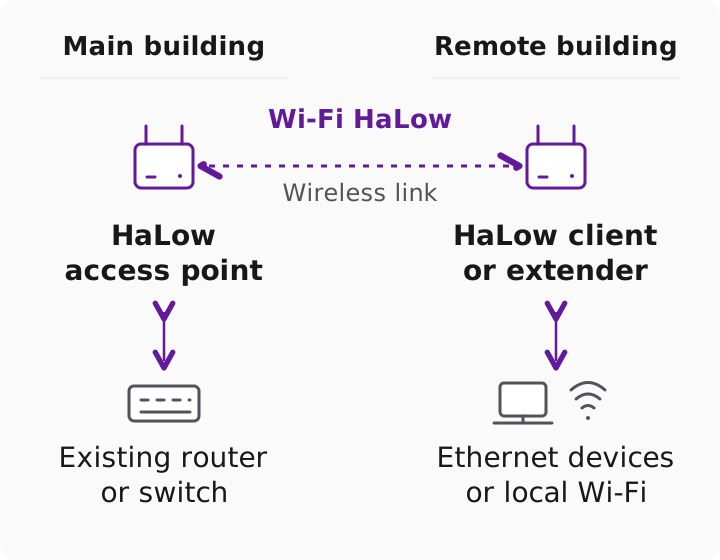
A pair of HaLowLink 2 devices can provide the HaLow connection and a 2.4 GHz hotspot for conventional Wi-Fi clients at the remote end. Choose the appropriate regional product and antenna, provide power at both ends, and follow the device's current setup guide. A normal phone or laptop does not connect directly to the HaLow radio without compatible hardware.
For a documented Ethernet-bridge example using HaLowLink 1, see APPNOTE-37: Virtual Wire. It is written for that platform and firmware context; use the guide that matches your equipment.
What should you test before installation?
- List the cameras, sensors and users, including simultaneous traffic and upload requirements.
- Inspect the path for buildings, vegetation and changes in ground level. Try the intended mounting positions.
- Measure useful throughput in both directions, packet loss and latency with your intended workload.
- Repeat the test during normal site activity and leave capacity for future devices.
The HaLow vs LoRaWAN calculator illustrates how assumptions affect modelled performance. For measured evidence and its limits, read the Joshua Tree field trial. For a site-specific equipment discussion, contact Morse Micro with your distance, region, obstructions and traffic requirements.